19.9.17

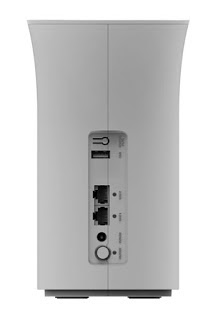
Unlock Huawei Lte CPE B593s-12 WiFi Router Gateway


How to Unlock Huawei LTE CPE B593 WiFi Router Gateway Router
If you are here, then you have arrived at the best and last-stop when it comes to Unlocking of Modems, Routers, MiFi's, Mobile Phones / iPhones Ect. We do Remote Code Unlocking and Direct Cable Unlocking since some devices never prompt for unlock codes and also sometimes requires Technical Flash work.

WARNING!!! DO NOT ENTER WRONG CODES AS YOUR DEVICE WILL BE PERMANENTLY BLOCKED.


The Unlocking process of Huawei Lte CPE B593 WiFi Router Gateway requires that you bring the Device for Full Unlock.
Unlocking wait time is between 30-45 mins.


UNLOCK FEE IS GHS 50.00
E-mail: fastunlockghana@gmail.com
Call / WhatsApp  +233561461686

CONTACT US +233561461686

Read More »

Unlocked MTN HUAWEI E5577s-321 4G LTE Mobile WiFi Router

Unlocked HUAWEI E5573 4G LTE Cat4 mobile hotspot
Unlocked HUAWEI E5577 4G LTE Cat4 mobile hotspot

Price:       GHS 230.00

Following the Huawei E5 classic design, Huawei E5577 looks like the predecessor models such as E5776, E5372, E5377. The E5577 LTE MiFi is in white or black color. It’s now already available for many network providers in Asia, Europe and Africa. As the second generation of LTE category 4 mobile hotspot, we will have a look at what’s improved in the new pocket router.

The Huawei E5577 looks smarter than its predecessors, perhaps because it becomes thinner. The body material is made of plastic but touch feel good. On the front, there is Huawei / network provider logo and power button which are located at the two sides of the 1.45 TFT LCD screen. On the top side, there is “Menu” button while the USB port and connectors for external antenna are on the bottom side.

The back cover could be removed for battery change. When open the back cover, we can see there are two slots for SIM card and MicroSD storage card. At the left side of the slot, there is a label where the model number, SSID, WiFi key (password), IMEI & S/N number are printed.

Buy Unlocked MTN E5577s-321

After the SIM card and battery is inserted in the E5577 LTE MiFi, you can press the power button on the front and the E5577 will fast boot in seconds. Huawei E5577 is still using standard 6-pin SIM card. Usually, the device will automatically configure and connect to network in a couple of minutes. But the E5577 will not do that, user need setup the router manually. You can log in the Huawei Mobile WiFI APP though smartphone or via web browser in PC to do that.

When the Huawei Mobile WiFi E5577 is working, user can see many information from the screen such as the network providers, SSID, WiFi key, signal strength, SMS unread, battery status and WiFi connected users. Like other Huawei E5 pocket WiFi, Huawei E5577 could support up to 10 wireless users to access internet simultaneously. And extra one could be connected with USB.

With LTE Category 4 technology, Huawei E5577 can achieve downlink speed to 150mbps and uplink speed to 50Mbps. When LTE network is not available, it can switch to 3G UMTS or 2G GSM networks. On 3G network, the peak download speed can reach 43.2Mbps. The E5577 can support WLAN 802.11b/g/n with dual-band. If you are located at areas with weak signal, it would be necessary to use the external antenna to improve the signal so that get better surfing experience.

The Huawei E5577 is also named E5577s. Here in Ghana, we have Huawei E5577s-321, which supports different LTE network frequency bands. They are for different markets. If you need this mobile hotspot, please check your local network frequency bands and then choose the right one. You can also contact us (FUT) for help. The Huawei E5577s-321 in Ghana from MTN provider supports the following networks:
1. MTN 4G & 3G
2. Surfline 4G
3. Telesol 4G
4. Vodafone
5. Glo
6. Airtel
7. tiGo

NOTE: Our unlock / decode does not damage the device. IMEI Number is not erased, Serial Number (SN) is not erased, WiFi name and password remains the same!
Unlocked MTN HUAWEI E5577s-321 4G LTE MiFi

Price:       GHS 230.00


Buy Unlocked MTN E5577s-321

It includes:
1 x Huawei E5573s-321
1x Removable battery
1 x User Guide
1 x USB cable

OUR UNLOCK DOES NOT DAMAGE THE DEVICE. THE RESET BUTTON WORKS PERFECTLY!

                          NOTHING CHANGES! EVERYTHING WORKS PERFECT!

For your NCK /  Unlock code:
E-mail: fastunlockghana@gmail.com
Call / WhatsApp  +233561461686
Read More »

15.9.17

Unlock MTN HUawei E5577s-321

Huawei E5577s-321 Locked to MTN Ghana
MTN, a carrier from Ghana has recently launched a new Huawei device, the E5577s-321. Unlocking of Huawei (E5577) E5577s-321 MTN device is a big process, and it takes at least 30 minutes. Currently, firmware 21.326.62.00.429 with WebUI WEBUI_17.100.18.01.429_MRE5 is available and can be unlocked.
Huawei E5577 Wireless Mobile WiFi

Huawei E5577 4G Mobile Hotspot is a new 4G Portable wireless router. It looks like Huawei E5377. With a 1.45 inch TFT LCD screen, user can see all the important info including the signal strength, network provider, battery status, SSID and password. Huawei E5577 is a LTE category 4 router, it supports download speed to 150Mbps and upload speed to 50Mbps. Up to 11 wireless devices can access internet simultaneously through Huawei E5577.
Huawei E5577s devices running firmware version 21.200.05.00.375 can be unlocked with normal procedure, means after changing the firmware unlocking is possible. But, other sub-models of E5577 does not allow the change the firmware. Either the devices are giving Error 19 or asking for the data lock code. In both of cases, you can’t unlock the Huawei E5577.

When you detect MTN E5577 MiFi in DC Unlocker, you will get the following info:

DC - Unlocker 2 Client 1.00.1375

Detecting modem :

selection :
manufacturer - Huawei modems
model - Auto detect (recommended)

Found Applications port COM28

Found modem         : E5577s-321
Model               : Huawei E5577 (untested)
IMEI                : 860782035387812
Serial NR.          : F5DDU17706005816
Firmware            : 21.326.62.00.429
Dashboard version   : WEBUI_17.100.18.01.429_MRE5
Web UI version      : WEBUI_17.100.18.01.429_MRE5
SIM Lock status     : Locked (Card Lock)
Wrong codes entered : 0 (unlock attempts left : 10)

For unlock, may require firmware change, check tutorial or contact support


How to unlock  E5577s and E5577Cs?

Unlocking of Huawei E5577s and E5577Cs MiFi Router is different than normal devices, as you need to dismantle it. The procedures are risky and any wrong steps can brick or damage your device, so we require that you bring the device for unlock.
You can also contact us and we will arrange to help you unlock your Huawei E5577s and E5577Cs MiFi Router remotely using "Teamviewer".

Let’s have a look on the Huawei E5577 sub-models, which is currently tested and can be unlocked:

1. E5577s-321 Viva Bahrain that comes with hardware version CL1E5573SM02, firmware 21.200.05.00.632 and Web UI 17.100.11.01.632.

2. E5577s-321 Tele 2 (Sweden) which is running with firmware 21.200.05.00.56

3. E5577s-932 Zain SA

4. E5577Cs-603 Bolt Indonesia known as "Bolt Slim 2"

5. E5577Cs-321 MTN Cameroon

9. Other models can also be unlocked.

How To Unlock Huawei E5577s-321 Locked to MTN Ghana?

THIS DEVICE REQUIRES DIRECT UNLOCK

Note : Unlocking/Decoding for Huawei E5577 is not free. Fee is GHC 40. If you are facing any problem, then leave a comment.

OUR UNLOCK DOES NOT DAMAGE THE DEVICE. THE RESET BUTTON WORKS PERFECTLY!

                          NOTHING CHANGES! EVERYTHING WORKS PERFECT!


For your NCK /  Unlock code
E-mail: fastunlockghana@gmail.com

Call / WhatsApp  +233561461686
Read More »

13.9.17

Unlock Busy Boost Even R02 4G LTE NetStation Router (Shanghai Boost Even Technology)

Boost Even R02 4G LTE NetStation Router (Shanghai Boost Even Technology)

Unlock Busy Boost Even R02 4G LTE NetStation Router

ATTENTION PLEASE:

The Unlock Process of this device requires that you bring it to our office for the service.
Waiting time is between 10-15 mins.

WE UNLOCK:

Vodafone Boost Even Router locked to Vodafone Uganda
Smile Boost Even Router locked to Smile Nigeria
Shanghai Boost Even Vodafone 4G NetStation Router locked to Vodafone Cameroon
Shanghai Boost Even Technology Vodafone NetStation Router
Other sub-models can also be unlocked!
INTERNATIONAL USERS SHOULD CONTACT US FOR UNLOCKING THIS DEVICE.
Busy Boost Even Router is a 4G LTE NetStation Router from Shanghai Boost Even Technology Limited.
Shanghai Boost Even Technology Limited launched Boost Even NetStation Router in Ghana with Busy Ghana. You may find this 4G device in other countries like Cameroon, Uganda, and Zambia locked to Vodafone; and in Nigeria locked to Smile Telecom.

BENEFITS

Connects up to 32 Wi-Fi enabled devices including Smartphones, Tablets, Laptops, Computers and Smart TVs.
For internet connectivity in the home or office

FEATURES

Plug and play – no installation required
4G LTE high speed
Supports Android, Windows & MAC operating systems
Includes 2 x RJ45 Ethernet port
No hassle user management interface.

Note : Unlocking/Decoding for Boost Even R02 is not free. Fee is GHC 35. If you are facing any problem, then leave a comment.

E-mail: fastunlockghana@gmail.com
Call / WhatsApp  +233561461686

CONTACT US +233561461686

Read More »